

INTRODUCTION
Artificial Intelligence has completely reshaped how students study in 2026. What once required hours of reading, rewriting, and revising can now be completed in minutes—without lowering academic quality. Instead, AI enhances clarity, improves comprehension, speeds up note-taking, and creates a structured learning environment that helps students retain information more efficiently.
In schools, colleges, universities, and professional training programs, AI has become a standard academic companion. Students across the world now use AI:
-
to create clean, structured notes
-
to summarize long textbooks
-
to convert handwritten notes into digital versions
-
to understand difficult concepts
-
to generate flashcards
-
to prepare for exams
-
to analyze weaknesses
-
to plan study schedules
-
to create diagrams and visual learning tools
AI isn’t a replacement for academic effort — it’s a force multiplier that enhances thinking, improves understanding, and reduces unnecessary time-consuming tasks.
Whether you’re preparing for school tests, competitive exams, university papers, or professional certifications, AI can help you study smarter, deeper, and more strategically.
This guide will show you exactly how to use AI the right way, combining the power of modern tools with a proven learning framework. By the end of this guide, you’ll have a complete AI-assisted study system you can apply to any subject, any grade level, anywhere in the world.https://velimoza.com/gemini-ultra-vs-claude-3-5-sonnet-comparison/
Why This 2026 Guide Matters
Many online “AI for students” articles only give superficial tips. This guide provides a full academic blueprint, covering:
-
complete AI note-taking systems
-
detailed step-by-step workflows
-
advanced prompts
-
AI-assisted research
-
productivity structures
-
flashcard creation
-
handwritten-to-digital workflows
-
exam prep and mock tests
-
realistic use cases
-
mistakes to avoid
-
ethics for responsible AI use
This is not just a list of tools.
This is a complete long-form framework for the modern AI-powered student.
CHAPTER 1: Why AI Is Now Essential for Students (2026 Deep Analysis)
AI has evolved far beyond auto-summaries and chatbots. Modern 2026 AI models like ChatGPT 5.1, Gemini Ultra 2, Claude 3.5, and NotebookLM 2 can understand textbooks, analyze PDFs, review research papers, and explain concepts with near-human clarity.
Here are the major reasons AI is now essential for studying:
1. Students face information overload
With textbooks, digital PDFs, class slides, YouTube lectures, podcasts, and online resources all competing for attention, students often feel overwhelmed.
AI helps by filtering and compressing information into exactly what matters.
2. Exams are more competitive than ever
Students worldwide must deal with tighter schedules, larger syllabi, and higher expectations.
AI provides:
-
fast notes
-
quick explanations
-
intelligent flashcards
-
mock tests
-
performance analysis
This level of support was impossible even a few years ago.
3. Time management is now critical
AI reduces time spent on:
-
reading long content
-
reformatting notes
-
hunting for explanations
-
creating summaries
-
preparing revision sheets
This gives students more time to focus on learning rather than organizing.
4. Multi-modal AI improves learning
Modern AI accepts:
-
text
-
PDFs
-
images
-
handwritten notes
-
audio recordings
-
YouTube lectures
-
graphs
-
diagrams
This creates a seamless, integrated learning environment.
5. Personalized learning is finally possible
Every student learns differently.
AI can now explain the same topic:
-
in simple language
-
in academic language
-
with real examples
-
with diagrams
-
with analogies
-
with step-by-step reasoning
-
for exam preparation
This flexibility dramatically improves understanding.

CHAPTER 2: Key Benefits of Using AI for Study (2026 Edition)
AI delivers several concrete, measurable benefits:
⭐ 1. Faster & cleaner notes
AI converts raw content into well-structured digital notes instantly.
⭐ 2. Shorter study time
Massive chapters become short, exam-friendly summaries.
⭐ 3. Better comprehension
AI explains concepts in multiple styles until the student understands.
⭐ 4. Memory-friendly study tools
AI auto-generates:
-
flashcards
-
quizzes
-
mnemonics
-
revision sheets
-
diagrams
⭐ 5. Personalized to your level
Whether you’re a beginner or an advanced learner, AI adapts explanations accordingly.
⭐ 6. Saves effort on repetitive tasks
AI handles formatting, structuring, summarizing, and organizing — so students focus on learning.
⭐ 7. Perfect for revision cycles
AI helps maintain:
-
1-day revision
-
7-day revision
-
spaced repetition
-
active recall sessions
CHAPTER 3: How AI Note-Taking Actually Works (2026 Framework)
Modern AI note-taking follows a 3-stage structure:https://velimoza.com/everyday-tasks-you-can-automate-2026/
Stage 1 — Extraction
AI pulls key information:
-
main ideas
-
definitions
-
examples
-
formulas
-
timelines
-
arguments
Stage 2 — Structuring
AI transforms extracted content into:
-
headings
-
subheadings
-
bullet points
-
tables
-
simplified explanations
Stage 3 — Enhancement
AI adds:
-
analogies
-
examples
-
diagrams (text-based)
-
flashcards
-
quick summaries
-
revision sheets

CHAPTER 4: The 2026 AI Note-Taking System (Full Step-by-Step Workflow)
Modern AI note-taking is not just about summarizing — it is a complete academic workflow used by top-performing students worldwide.
Here is the ultimate 2026 system:
STEP 1 — Gather Input Materials
AI now supports multiple inputs:
-
PDF chapters
-
Full textbooks
-
Class notes
-
Lecture slides
-
Handwritten notebook pages
-
Screenshots
-
YouTube lectures
-
Recorded audio
-
Web articles
-
Research papers
You simply upload or paste them into the AI tool of your choice.
Pro Tip:
Scan handwritten notes using Microsoft Lens, Google PhotoScan, or Notion Scan for best accuracy.
STEP 2 — Ask AI to Extract Key Information
This step ensures AI identifies:
-
concepts
-
definitions
-
formulas
-
arguments
-
references
-
examples
-
key points
-
exam-relevant sections
Extraction Prompt
STEP 3 — Convert Extracted Data into Structured Notes
AI transforms raw data into clean academic notes.
Conversion Prompt
STEP 4 — Add Enhancements for Better Learning
This is where AI becomes a powerful learning assistant.
Enhancements include:
-
analogies
-
real-world examples
-
text-based diagrams
-
revision blocks
-
module summaries
-
flashcards
-
questions
Enhancement Prompt
STEP 5 — Personalize Notes to Your Learning Level
AI adjusts notes based on:
-
elementary
-
high school
-
undergraduate
-
postgraduate
-
competitive exam
-
professional exam
Personalization Prompt
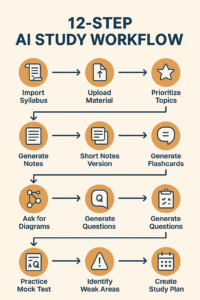
CHAPTER 5: The 2026 AI Study Workflow™ (Powerful 12-Step System)
This scientifically optimized flow is used by high-achieving students globally.
STEP 1 — Import your entire syllabus
Paste or upload the complete syllabus and ask AI to break it into modules.
STEP 2 — Upload all study material
PDFs, videos, notes, etc.
STEP 3 — Ask AI to prioritize important topics
AI identifies high-yield topics.
STEP 4 — Generate full chapter notes
Clean, structured, exam-ready notes.
STEP 5 — Ask AI for “short notes version”
Perfect for revision.
STEP 6 — Generate flashcards for memory
AI makes active recall easy.
STEP 7 — Ask AI for diagrams / flowcharts
Useful for biology, business, science, law, etc.
STEP 8 — Get explanations of difficult topics
AI explains at any level.
STEP 9 — Generate exam-style questions
MCQs, short answers, reasoning questions.
STEP 10 — Practice mock tests
AI scores and evaluates your performance.
STEP 11 — Identify weak areas
AI analyzes your answers and gives improvement plans.
STEP 12 — Create 7-day and 30-day study plans
AI creates a personalized timetable.
CHAPTER 6: Best AI Tools for Study & Notes (2026 Comparison)
Below is the updated 2026 comparison table:
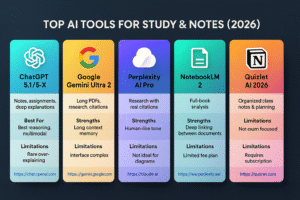
Top AI Tools with Strengths & Weaknesses
| AI Tool | Best For | Strengths | Limitations | External Link |
|---|---|---|---|---|
| ChatGPT 5.1 / 5-X | Notes, assignments, deep explanations | Best reasoning, multimodal | Rare over-explaining | https://chat.openai.com |
| Google Gemini Ultra 2 | Long PDFs, research, citations | Long-context memory | Interface complex | https://gemini.google.com |
| Claude 3.5 Sonnet | Ethical reasoning, literature, writing | Human-like tone | Not ideal for diagrams | https://claude.ai |
| Perplexity AI Pro | Research with real citations | Reliable sources | Not great for long study notes | https://www.perplexity.ai |
| NotebookLM 2 | Full-book analysis | Deep linking between documents | Limited free plan | https://notebooklm.google |
| Notion AI 2026 | Organized class notes & planning | Templates + workflows | Not exam-focused | https://www.notion.so |
| Quizlet AI 2026 | Flashcards | Strong SRS system | Requires subscription | https://quizlet.com |
| Otter.ai 2026 | Lecture transcriptions | Real-time notes | Audio quality dependent | https://otter.ai |
CHAPTER 7: 40+ AI Prompts for Students (Copy-Paste Ready)
Prompts matter.
2026 AI models respond best to clear, structured, context-rich commands.
⭐ PROMPTS FOR NOTES
1. Comprehensive Academic Notes
2. Short Exam Notes
⭐ PROMPTS FOR SUMMARY
3. 40-page PDF Summary
⭐ PROMPTS FOR EXPLANATION
4. Explain like I am 12
5. Advanced Explanation
⭐ PROMPTS FOR FLASHCARDS
6. Flashcard Generator
⭐ PROMPTS FOR EXAM PRACTICE
7. MCQ Generator
⭐ PROMPTS FOR HANDWRITTEN NOTES
8. Convert Handwritten Notes
CHAPTER 8: Real Example — AI-Generated Class Notes
Let’s take a simple example topic:
Photosynthesis (Basic Biology)
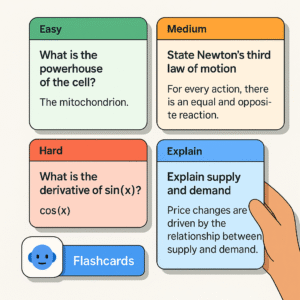
Example Output (2026 AI Quality)
Definition:
Photosynthesis is the biochemical process through which plants convert sunlight, carbon dioxide, and water into glucose (energy) and oxygen.
Equation:
CO₂ + H₂O + Sunlight → Glucose + O₂
Key Steps:
-
Sunlight absorbed by chlorophyll
-
Water split into hydrogen and oxygen
-
Carbon dioxide reduced
-
Glucose synthesized
-
Oxygen released
Flashcard Example:
-
Q: What pigment absorbs sunlight?
A: Chlorophyll.
CHAPTER 9: How to Use AI for Assignments (2026 Academic Workflow)
Assignments in 2026 are no longer restricted to manual reading, writing, and formatting. AI has now become an academic assistant that helps students produce higher-quality work—without cheating.
AI should be used as a tool for:
-
structuring
-
brainstorming
-
researching
-
drafting
-
editing
-
organizing
-
proofreading
NOT for copy-pasting full answers blindly.
Below is the ethical, professional, and widely accepted workflow used in universities.

STEP 1 — Provide AI With Full Assignment Instructions
Paste your assignment description, rubric, word count, and deadline.
Prompt
AI will identify:
-
required sections
-
learning outcomes
-
evaluation criteria
-
referencing style (APA, MLA, Chicago)
STEP 2 — Ask AI to Create an Outline
Before writing anything, AI should organize structure.
Prompt
STEP 3 — Use AI for Research, NOT for Final Writing
AI can gather:
-
definitions
-
theories
-
case studies
-
statistics
-
examples
-
references
-
scholarly sources
Prompt
External research links:
-
Google Scholar → https://scholar.google.com
-
Semantic Scholar → https://semanticscholar.org
-
ResearchGate → https://researchgate.net
STEP 4 — Ask AI for Sample Paragraphs
Use these to understand tone and depth, then rewrite yourself.
Prompt
STEP 5 — Ask AI to Create Diagrams, Tables, and Comparison Charts
Prompt
STEP 6 — Final Editing & Flow Check
AI ensures coherence.
Prompt
STEP 7 — Rewrite to Avoid AI-Detection & Plagiarism
2026 universities require natural, human-level writing.
Prompt
CHAPTER 10: AI for Exam Preparation (2026 Deep Preparation System)
AI is now a full exam-preparation engine, capable of supporting:
-
conceptual learning
-
practice questions
-
timed tests
-
performance analysis
-
weak area identification
-
revision planning
This is crucial for exams like:
-
SAT
-
IELTS/TOEFL
-
GMAT/GRE
-
Medical entrance exams
-
Engineering tests
-
Law exams
-
University finals
-
Professional certification exams
⭐ STEP 1: AI-Made Exam-Ready Notes
AI condenses entire chapters into exam-relevant key points.
Prompt
⭐ STEP 2: AI-Generated Exam Questions
Different exam styles can be generated:
-
MCQs
-
one-mark questions
-
reasoning questions
-
case studies
-
long answers
-
essay prompts
Prompt
⭐ STEP 3: Create Full Mock Tests
AI simulates real exam conditions:
-
timed tests
-
scoring
-
explanations
Prompt
⭐ STEP 4: Performance Analysis
AI identifies weaknesses, patterns, and gaps in understanding.
Prompt
⭐ STEP 5: 1-Day and 7-Day Revision Plans
Perfect for last-minute preparation.
Prompt
CHAPTER 11: AI for Handwritten Notes (OCR + AI 2026 Workflow)
Handwritten notes remain essential, especially in lectures.
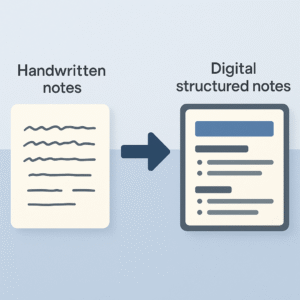
Thankfully, 2026 AI tools can transform messy handwritten pages into clean, structured, digital notes.
STEP 1 — Capture Clear Images
Use:
-
Microsoft Lens
-
Notion Scan
-
Google Photos OCR
-
Apple LiveText
STEP 2 — Upload to AI Tool
Prompt
STEP 3 — Ask AI to Fix Errors
Prompt
STEP 4 — Convert to a Summary Version
Useful for revision.
STEP 5 — Ask AI to Generate Flashcards
Instant active recall tools.
CHAPTER 12: AI for Flashcards (SRS-Optimized Memory System 2026)
AI creates powerful flashcards based on:
-
active recall
-
spaced repetition
-
difficulty levels
-
memory optimization
Flashcards help especially in subjects like:
-
biology
-
law
-
medicine
-
vocabulary
-
history
-
business
Flashcard Creation Prompt
Advanced Flashcard Prompt
CHAPTER 13: AI for Research (Accurate, Verified & Fast)
AI helps with:
-
literature reviews
-
citation searching
-
summarizing scholarly papers
-
identifying methodologies
-
generating hypotheses
-
comparing research theories
However — verification is required.
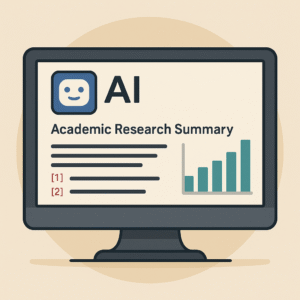
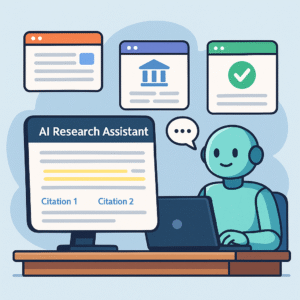
[Image Placeholder: AI summarizing academic research with citation links]
Research Prompt
Verify Citation Prompt
Useful External Links for Research
-
Google Scholar → https://scholar.google.com
-
PubMed → https://pubmed.ncbi.nlm.nih.gov
-
JSTOR → https://www.jstor.org
-
ScienceDirect → https://sciencedirect.com
CHAPTER 14: AI for Coding Students (2026 Super-Tools)
Coding students benefit hugely from AI’s ability to:
-
explain code
-
debug errors
-
rewrite more efficient code
-
analyze complexity
-
generate comments
-
simulate outputs
-
teach concepts
Languages included:
-
Python
-
JavaScript
-
C++
-
Java
-
Go
-
Rust
-
SQL
-
HTML/CSS

1. Code Explanation Prompt
2. Debug Prompt
3. Optimization Prompt
CHAPTER 15: AI for Productivity & Time Management
AI is now a complete study planner capable of:
-
scheduling tasks
-
generating timetables
-
creating focus cycles
-
tracking progress
-
recommending improvements
Tools like Notion AI Planner, Motion AI, and Google Study Graph are extremely popular.
Daily Study Plan Prompt
Pomodoro Focus Prompt
CHAPTER 16: Common AI Study Mistakes Students Must Avoid (2026 Awareness Guide)
While AI is extremely powerful, many students misuse it—leading to weaker understanding, academic penalties, or failed assignments. Here are the biggest mistakes students must avoid in 2026.
❌ Mistake 1 — Copying AI-generated answers without learning
This eliminates critical thinking and reduces your ability to solve problems independently.
Correct approach:
Use AI answers as reference, not replacement.
❌ Mistake 2 — Not verifying facts
AI can occasionally produce outdated or incorrect data (hallucinations).
Always cross-check using:
-
Google Scholar
-
Wikipedia (as a start, not final source)
-
Official textbooks
-
Trusted academic sources
❌ Mistake 3 — Using too many tools at once
This causes confusion and breaks workflow.
Solution:
Stick to 1–2 tools for notes, and 1 dedicated AI for practice.
❌ Mistake 4 — Asking weak prompts
Weak prompts = weak results.
Your prompts must be structured, clear, and detailed.
❌ Mistake 5 — Over-dependence on AI
AI amplifies learning. It does NOT replace learning.
❌ Mistake 6 — Submitting AI-generated assignments directly
This is academically unethical and detectable in 2026.
Use AI to learn, draft, outline, and refine — not blindly submit.
CHAPTER 17: Ethical AI Usage for Students (2026 Standards)
Ethical usage ensures AI becomes a positive tool that enhances your education.
[Image Placeholder: Ethical guidelines for using AI responsibly]
✔️ 1. Use AI as a study partner, not a shortcut
Understanding is your responsibility.
✔️ 2. Credit AI assistance when required
Many universities now require “AI-Assisted Declaration.”
✔️ 3. Use AI to enhance clarity, not replace skill-building
Use it to simplify concepts, not avoid them.
✔️ 4. Evaluate AI-based research carefully
Cross-check references and ensure academic accuracy.
✔️ 5. Write your final assignment draft yourself
AI helps with clarity and structure — but YOU must produce the final natural version.
CHAPTER 18: Conclusion
Artificial Intelligence has fundamentally transformed how students learn, organize, manage, and review academic material. In 2026, AI is no longer just a helpful tool — it is a full-fledged academic ecosystem that supports deeper understanding, faster study cycles, and more effective revision.
By integrating AI into your daily study routine, you experience:
-
higher retention
-
cleaner, more organized notes
-
better comprehension
-
time savings
-
reduced stress
-
structured revision systems
-
personalized learning paths
Today’s AI tools go beyond summarization. They create comprehensive study environments that mirror the roles of tutors, planners, content creators, researchers, and revision coaches — all within a single interface.
This guide provided you with a complete workflow:
-
how to use AI for notes
-
how to use AI for assignments
-
how to create flashcards
-
how to prepare for exams
-
how to convert handwritten notes
-
how to conduct academic research
-
how to plan study timetables
-
how to optimize learning strategies
If you follow the techniques and prompts included in this guide, AI will no longer feel like a shortcut — it will become a powerful extension of your learning capability.
As the world continues to evolve, students who adapt AI correctly will study smarter, perform better, and build stronger academic confidence.
The future of learning is not about working harder — it’s about learning efficiently, intelligently, and sustainably.
With AI as your study partner, you are positioned to thrive in 2026 and beyond.
CHAPTER 19: 20-Question FAQ

FAQ 1 — Can AI really help students study better?
Yes, AI improves note-taking, explanations, revision, flashcards, and understanding.
FAQ 2 — What is the best AI tool for studying in 2026?
ChatGPT 5.1, Google Gemini Ultra 2, and Claude 3.5 are the top choices.
FAQ 3 — Does AI replace teachers or tutors?
No. AI enhances learning but does not replace human teaching.
FAQ 4 — Can AI help with exam preparation?
Yes, through mock tests, flashcards, explanations, summaries, and revision plans.
FAQ 5 — Is AI safe for academic use?
Yes, if you cross-check facts and do not submit AI-generated work directly.
FAQ 6 — Can AI understand PDFs and textbook chapters?
Modern AI (2026) can analyze PDFs up to thousands of pages.
FAQ 7 — Can AI create diagrams for study?
Yes, text-based and conceptual diagrams are fully supported.
FAQ 8 — What’s the best way to use AI for notes?
Upload material → extract → structure → enhance → personalize → revise.
FAQ 9 — Does AI help with handwritten notes?
Yes, using OCR + AI conversion tools.
FAQ 10 — Is AI good for competitive exams?
Extremely — especially for revision, notes, and practice questions.
FAQ 11 — Does AI help with coding subjects?
Yes, AI explains code, debugs, rewrites, and teaches programming concepts.
FAQ 12 — Can AI generate study schedules?
Yes, AI can generate 1-day, weekly, and monthly plans.
FAQ 13 — Is AI allowed in universities?
Yes, with ethical guidelines and proper declaration.
FAQ 14 — Can AI detect my weak areas?
Through mock tests, yes.
FAQ 15 — Does AI reduce study time?
On average, students save 30–50% time by using AI effectively.
FAQ 16 — Which AI tool is best for flashcards?
Quizlet AI, Notion AI, and ChatGPT flashcard exporters.
FAQ 17 — Can AI help with research papers?
Yes — as long as sources are verified.
FAQ 18 — Can AI summarize long videos?
Yes, especially with YouTube link summarization features.
FAQ 19 — Can AI break down complex topics?
Yes — and it can do so at any difficulty level.
FAQ 20 — Should I rely ONLY on AI?
No. AI supports learning — it does not replace studying.
CHAPTER 21: External Links (Authoritative Sources)
-
Google Scholar: https://scholar.google.com
-
MIT OpenCourseWare: https://ocw.mit.edu
-
Britannica Education: https://www.britannica.com
-
PubMed: https://pubmed.ncbi.nlm.nih.gov
-
ScienceDirect: https://sciencedirect.com