
Introduction: Why Writing Emails with AI Matters in 2026
“How to Write Emails Using AI is becoming an essential skill in 2026 as professionals and students rely on AI to craft clear, fast, and effective communication.”How to Write Emails Using AI (Complete Breakdown)
Email has been the backbone of global communication for more than 30 years, but in 2026, it has entered a completely new era. Thanks to artificial intelligence, writing emails is no longer a time-consuming, stressful, or error-prone task. Instead of spending minutes—or sometimes hours—thinking, drafting, editing, and rewriting, AI tools can now help you create a clear, professional, perfectly structured email within seconds.
From business communication and sales outreach to academic requests, complaints, follow-ups, announcements, and customer support, AI has transformed how the world writes.
But the biggest question people ask today is:
How do you actually write emails using AI the right way?
Because writing with AI is not just about clicking a button.
It’s about knowing:
-
what to provide
-
how to instruct
-
how to set tone
-
how to generate multiple variations
-
how to check accuracy
-
and how to keep your writing human and personal
This guide solves all of these problems.
Why AI Email Writing Is Becoming the New Standard
1. Saves Time — Up to 80% Faster Writing
Professionals, students, freelancers, and businesses spend up to 4 hours/day drafting and replying to emails.
AI reduces this dramatically by helping you draft complete, polished messages in seconds.
2. Eliminates Grammar, Tone, and Formatting Errors
AI ensures perfect:
-
grammar
-
sentence flow
-
tone
-
structure
-
clarity
-
punctuation
Even native English speakers rely on AI to refine their communication.
3. Produces More Professional & Clear Emails
AI helps you sound:
-
confident
-
polite
-
clear
-
direct
-
structured
Without being rude or robotic.
4. Ideal for Non-Native English Writers
AI helps international professionals communicate with global teams effortlessly.
It fixes:
-
awkward phrasing
-
unclear sentences
-
informal tone
-
vocabulary errors
And turns your message into a polished, natural English email.
5. AI Understands Context Better Than Ever
In 2026, AI tools can analyze your purpose, emotion, audience, and tone— then adjust the email accordingly.
This makes the writing feel human-like, not robotic.
What This Full Guide Will Teach You
-
How AI understands your email needs
-
How to structure prompts that produce perfect emails
-
When to use short prompts vs. long contextual prompts
-
How to set tone (formal, friendly, neutral, urgent)
-
How to get AI to rewrite emails in your voice
-
Templates you can use instantly
-
Best AI tools for email writing
-
Common mistakes people make with AI
-
How to personalize AI emails so they never feel robotic
-
How to automate recurring emails
-
How to generate replies, follow-ups, reminders
-
How to use AI for cold outreach + sales emails
-
How to use AI securely without leaking sensitive information
By the end of this guide, you’ll be able to write any type of email in less than 30 seconds, without losing your personal touch or professionalism.
Who This Guide Is For
This guide is tailored for:
-
Business professionals
-
Entrepreneurs
-
Students
-
Job seekers
-
Customer support teams
-
HR professionals
-
Sales & marketing teams
-
Freelancers
-
Managers & team leaders
-
Anyone who writes emails daily
If you need clear, effective, human-friendly email writing—this guide is for you.https://velimoza.com/how-to-use-ai-for-study-and-notes-2026/
Understanding How AI Actually Writes Emails
Most people think AI “writes” an email magically—but the reality is more structured, logical, and predictable.
Once you understand this process, you can control AI output like a pro and generate perfect emails every time.
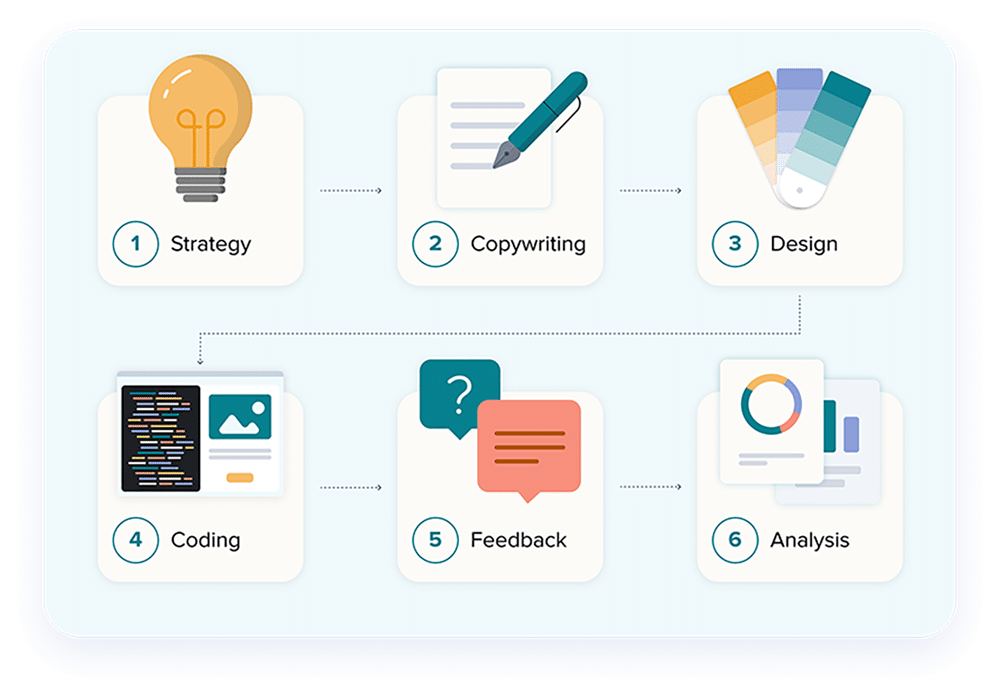
AI email writing works through 5 main steps:
1. You Give AI the Input (Prompt)
AI cannot read your mind.
It only knows what you tell it.
Your input can be:
A. A short instruction
“Write a polite email asking for a meeting.”
B. A detailed instruction
“Write a professional email to my project manager, requesting an extension for the deadline because my team is waiting for client approval.”
C. A reference
“Rewrite this email clearly and professionally:
Hi Sam,
Sorry for late. Can we change meeting to tomorrow?”
D. A bullet list of what you want
“I want an email that:
-
thanks the customer
-
apologizes for delay
-
gives updated delivery date
-
offers support”
E. A tone request
“Write it in a friendly but professional tone.”
The quality of the email depends on the clarity of your prompt.https://velimoza.com/skills-you-need-before-2030-future-guide/
2. AI Analyzes Your Context
In 2026, AI analyzes your input in milliseconds to understand:
-
Who the email is for
-
What the purpose is
-
What tone is appropriate
-
What structure is required
-
What information is missing
AI uses natural language understanding (NLU) to guess the emotional intent too — whether the message should be urgent, polite, apologetic, neutral, persuasive, or confident.
3. AI Selects the Most Suitable Writing Structure
Different emails follow different structures.
For example:
A. Professional Request Email Structure
-
Greeting
-
Clear request
-
Reason
-
Polite ending
-
Signature
B. Apology Email Structure
-
Acknowledgment
-
Apology
-
Correction
-
Future assurance
-
Closing line
C. Sales Email Structure
-
Hook
-
Value
-
Offer
-
CTA
-
Sign-off
AI automatically selects the right template based on your request.
4. AI Generates the First Draft
This draft includes:
-
complete sentences
-
proper formatting
-
consistent tone
-
improved clarity
-
grammar and spelling corrections
AI uses a mixture of:
-
language patterns
-
professional email datasets
-
tone models
-
reasoning algorithms
This ensures the email is clean and human-like.
5. AI Polishes Tone, Clarity & Professionalism
Modern AI tools (2026) apply final refinements such as:
-
improving transitions
-
smoothing tone
-
removing redundancy
-
checking politeness
-
adding context
-
formatting with correct spacing
This is why AI emails sound clean, logical, and professional.
Why Understanding This Process Is Important
Because once you know how AI works, you can:
-
write better prompts
-
get exactly the tone you want
-
avoid robotic wording
-
generate perfect emails on the first try
-
refine drafts much more easily
AI is powerful — but only when used correctly.https://velimoza.com/using-ai-in-daily-work-2026/
SECTION A — The 5-Step Framework to Write Emails Using AI
This simple method works for every AI tool (ChatGPT, Gemini, Claude, Perplexity, etc.).
STEP 1: Tell AI the Purpose of the Email
AI needs clarity.
Examples:
-
“I want to reschedule a meeting.”
-
“I want to request product information.”
-
“I want to apologize for a mistake.”
-
“I want to follow up on my job application.”
What NOT to do:
“Write an email.”
(Too vague.)
STEP 2: Tell AI Who You Are Writing To
AI writes differently depending on the receiver.
Examples:
-
“to my manager”
-
“to a customer”
-
“to HR”
-
“to a colleague”
-
“to a professor”
This helps AI set the correct politeness level.
STEP 3: Add the Key Details (Short Bullets Are Best)
Example:
“My key details:
-
meeting was supposed to be today
-
I am sick
-
request for next Monday
-
keep it brief and polite”
AI uses these bullets to craft a precise message.
STEP 4: Specify the Tone
Tone changes everything.
Common tone options:
-
formal
-
polite
-
friendly
-
confident
-
neutral
-
urgent
-
apologetic
-
persuasive
Example:
“Write it in a polite and professional tone.”
STEP 5: Ask AI for 2–3 Variations
Professional writers ALWAYS compare drafts.
Example:
“Give me 3 versions to choose from.”
This prevents robotic repetition.
SECTION B — The Perfect Prompt Formula (Copy–Paste)
Here is the universal prompt structure that produces perfect emails every time:
💡 Master Prompt
You can paste this into any AI tool.
SECTION C — Real Email Examples Created Using This Formula
Below are real AI-written examples using the method above.
1. Professional Meeting Rescheduling Email
Prompt Used:
AI Output (Human Style):
Subject: Request to Reschedule Today’s Meeting
Hi [Manager Name],
I hope you are doing well. I’m feeling unwell today and won’t be able to attend our scheduled meeting.
Would it be possible to move it to next Monday at 11 AM?
Thank you for your understanding.
Best regards,
[Your Name]
2. Customer Support Response Email
Prompt:
AI Output:
Subject: Update on Your Order
Hello [Customer Name],
Thank you for your patience. I sincerely apologize for the delay in your delivery.
Your order is now scheduled to arrive on Thursday.
If you need any help in the meantime, please feel free to reply to this email.
Warm regards,
[Your Name]
3. Job Application Follow-Up Email
Prompt:
AI Output:
Subject: Follow-Up on Marketing Associate Application
Dear [Hiring Manager],
I hope you are doing well. I wanted to follow up on my application for the Marketing Associate position submitted two weeks ago.
I remain very interested in the role and would appreciate any update on the hiring timeline.
Thank you for your time and consideration.
Sincerely,
[Your Name]
4. Friendly Email to a Colleague
Prompt:
AI Output:
Hi [Name],
Quick update — Phase 1 of the project is complete.
Can you review it and share your feedback by Friday?
Thanks!
[Your Name]
SECTION D — Making AI Emails Sound Human (Not Robotic)
AI emails sound robotic when:
-
sentences are too formal
-
vocabulary is repetitive
-
tone is overly corporate
-
everything sounds “perfect”
To fix this, tell AI:
-
“Make it sound more natural.”
-
“Make it more human and less formal.”
-
“Add slight warmth and personality.”
-
“Shorten the sentences.”
-
“Make it sound like real people talk.”
Small tweaks make a huge difference.
SECTION E — What to Avoid When Using AI for Emails
❌ Don’t give vague prompts
AI needs direction.
❌ Don’t forget key details
AI cannot guess your situation.
❌ Don’t accept the first draft blindly
Ask for 2–3 versions.
❌ Don’t forget to proofread names, dates, numbers
AI makes mistakes if details are unclear.
❌ Don’t copy/paste with sensitive info
Rewrite confidential details manually.
1. ChatGPT (OpenAI)
Best For:
Professional emails, detailed emails, rewriting, tone adjustment, long responses.
Strengths:
✔ Deep reasoning
✔ Human-like writing
✔ Excellent tone control
✔ Can rewrite emails in your exact style
✔ Great for emails requiring explanation
✔ File uploads for context
✔ Generates multiple versions
Weaknesses:
✘ Not real-time
✘ Requires clear prompting
Perfect For:
-
Business communication
-
HR emails
-
Formal requests
-
Customer support
-
Email rewriting
-
Long or complex emails
2. Gemini (Google)
Best For:
Fast, simple, short emails with a clean professional tone.
Strengths:
✔ Very fast
✔ Great grammar & clarity
✔ Clean professional tone
✔ Fully integrated with Gmail (2026)
✔ Excellent for short or medium emails
Weaknesses:
✘ Less detailed than ChatGPT
✘ Sometimes too brief
Perfect For:
-
Quick replies
-
Gmail users
-
Short work emails
-
Polished one-paragraph messages
3. Claude (Anthropic)
Best For:
Human-tone emails that feel warm, empathetic, and very natural.
Strengths:
✔ Best emotional tone
✔ Very natural & kind writing
✔ Great for sensitive conversations
✔ Long-context understanding
Weaknesses:
✘ Not ideal for highly structured business emails
✘ Limited integrations
Perfect For:
-
Apology emails
-
HR discussions
-
Conflict resolution
-
Customer support with empathy
-
Friendly communication
4. Perplexity AI
Best For:
Short factual emails that require accuracy and real-time information.
Strengths:
✔ Real-time web data
✔ Very fast
✔ Clears factual queries
✔ Excellent for concise messages
Weaknesses:
✘ Weak in long-form writing
✘ Less emotional tone control
Perfect For:
-
Sales outreach that includes facts/data
-
Quick updates
-
Accurate bullet-structured emails
5. Grammarly AI
Best For:
Rewriting, polishing, grammar fixing, tone adjustment.
Strengths:
✔ Great for editing emails
✔ Fixes tone instantly
✔ Enhances clarity
✔ Perfect add-on tool
Weaknesses:
✘ Not as creative
✘ Doesn’t write long emails well
Perfect For:
-
Polishing drafts
-
Checking tone
-
Fixing mistakes
-
Improving clarity
6. Notion AI
Best For:
Teams, workflow-based emails, documentation + email writing.
Strengths:
✔ Great for collaborative writing
✔ Good templates
✔ Good for drafting internal emails
Weaknesses:
✘ Sometimes generic
✘ Not ideal for external business communication
Perfect For:
-
Internal updates
-
Team communication
-
Drafting fast email outlines
7. Microsoft Copilot
Best For:
Corporate users in Outlook & Teams.
Strengths:
✔ Deeply integrated with Outlook
✔ Summarizes long threads
✔ Writes replies based on email history
✔ Great for corporate environments
Weaknesses:
✘ Less creative
✘ Works best with enterprise setup
Perfect For:
-
Corporate teams
-
Outlook users
-
Thread summarization
-
Auto-reply generation
Comparison Table — Best AI Tools for Emails (2026)
| AI Tool | Best For | Strengths | Weaknesses |
|---|---|---|---|
| ChatGPT | Complex & long emails | Deep reasoning, tone control | Not real-time |
| Gemini | Quick, simple emails | Fast, clean, Gmail integration | Short responses |
| Claude | Warm, human tone | Natural, empathetic writing | Less formal structure |
| Perplexity | Data-based emails | Real-time facts | Weak long-form writing |
| Grammarly AI | Editing emails | Tone + grammar correction | Not creative |
| Copilot | Corporate email | Thread summarization | Best in enterprise |
| Notion AI | Team workflows | Templates + organization | Generic writing |
Now that you know the tools and basics, this section teaches you advanced AI email mastery — the tactics professionals use to write flawless emails in seconds.
You’ll learn:
-
Advanced prompting
-
Automation techniques
-
How to generate replies with context
-
How to write complex business emails
-
How to create templates with AI
-
How to personalize emails (avoid robotic tone)
-
How to automate recurring emails
-
Time-saving shortcuts
SECTION A — Advanced AI Prompting for Perfect Emails
Beginner prompts = basic emails
Advanced prompts = powerful, human-quality emails
Here are the top frameworks:
1. The “Role-Based Prompt” Technique
Tell the AI who it should act as.
Examples:
-
“Act as a corporate HR manager…”
-
“Act as a senior sales representative…”
-
“Act as a polite customer support agent…”
Template:
2. The “Rewrite in My Style” Technique
AI can learn your writing style and replicate it.
Example Prompt:
AI will now write future emails like you, not like a robot.
3. The “Email + Response” Technique
Perfect for replying to existing emails.
Prompt Template:
Write a professional reply that:
– acknowledges the message
– answers all points
– asks any needed questions
– closes politely
Tone: [Tone]
AI creates a perfect response.
4. The “Two-Tone” Prompt
Sometimes emails should be:
-
friendly + professional
-
strict + polite
-
firm + respectful
Prompt Example:
This produces natural results.
5. The “Multi-Version” Prompt
Get options like a human writer.
Choose the one you like.
SECTION B — Writing Specialized Emails with AI (High-Value Examples)
Below are advanced, high-demand email types:
1. Sales Outreach Email (Persuasive & Clear)
Prompt:
2. Job Application Email (Professional & Personal)
Prompt:
3. Apology Email (Warm + Responsible)
Prompt:
4. Complaint Email (Firm + Polite)
Prompt:
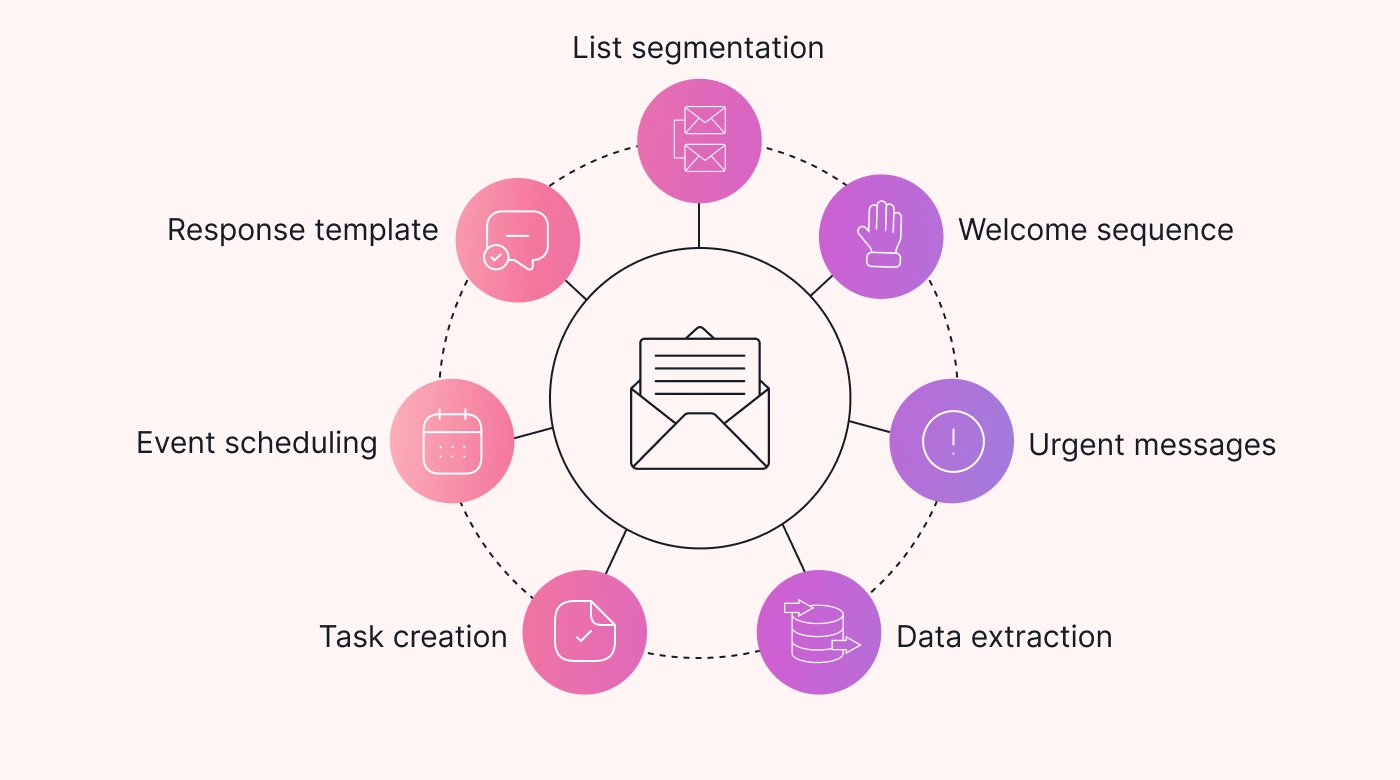
SECTION C — Automating Emails with AI (2026)
AI can now automate large portions of your email life.
Here are methods professionals use:
1. AI Drafts → You Approve → Send
Quickest and most popular method.
-
AI writes
-
You edit
-
You send
2. Pre-Saved AI Templates
Example:
-
follow-ups
-
reminders
-
cold outreach
-
HR communication
You can create a library of 20–30 AI-made templates and use them anytime.
3. AI Auto-Replies (Smart Replies)
Tools like ChatGPT, Copilot, and Gmail Gemini can read incoming email threads and generate:
-
summaries
-
suggested replies
-
tone-adjusted responses
4. AI Calendar Integration
Email scheduling becomes automated when AI connects to your calendar:
-
auto-confirming meetings
-
sending reminders
-
writing reschedule messages
5. AI-Based Workflow Automation
Using tools like Zapier + AI, you can automate:
-
welcome emails
-
onboarding emails
-
invoice reminders
-
customer follow-ups
-
subscription renewal reminders
SECTION D — How to Make AI Emails Sound Human
This is where most people fail — their emails sound too corporate or robotic.
Use these prompts for natural tone:
1. “Make it sound like normal office communication.”
2. “Use natural, conversational English.”
3. “Reduce formality by 20%.”
4. “Add a polite, human touch.”
5. “Avoid overly long sentences.”
6. “Make it warm but not emotional.”
These instructions transform the output dramatically.
SECTION E — Common Mistakes to Avoid
❌ Overly formal tone
❌ Using long jargon-heavy sentences
❌ Forgetting to specify who the email is for
❌ Not asking for variations
❌ Copy-pasting without editing
❌ Including sensitive data in prompts
❌ Relying fully on AI without personalization
Small mistakes = robotic emails
Small tweaks = perfect human emails
1. Conclusion — The Future of Email Writing with AI (2026 & Beyond)
Email communication is changing faster than ever. What once took hours—drafting, editing, rewriting, formatting—now takes seconds with AI. But the real power of AI isn’t speed; it’s clarity, confidence, professionalism, and human-like precision.
By following the methods in this guide, you can now:
-
Write emails 80% faster
-
Maintain a consistent professional tone
-
Avoid mistakes and miscommunication
-
Respond to complex messages clearly
-
Personalize your voice
-
Automate recurring tasks
-
Use AI tools to support daily work
-
Communicate confidently without stress
The world is embracing AI-powered communication, and you now have the complete skill set to use it effectively, ethically, and professionally.
Final Thoughts:
AI won’t replace human communication.
It enhances it.
It sharpens your ideas, organizes your thoughts, and makes you sound more polished.
But your intent, tone, and clarity always remain at the center.
AI is the tool — you are the communicator.
2. Frequently Asked Questions (FAQ)
1. Is it okay to use AI for writing emails?
Yes. In 2026, AI-assisted email writing is normal in business, education, HR, customer service, and corporate communication. It’s professional and widely accepted.
2. Will my emails sound robotic?
Not if you give clear prompts like:
-
“Make it sound natural.”
-
“Use everyday conversational English.”
-
“Add a warm human tone.”
3. Can AI write confidential emails?
Yes, but avoid adding sensitive details. You can always replace sensitive items after AI drafts the message.
4. What’s the best AI tool for writing emails?
-
ChatGPT → Best overall
-
Gemini → Best for Gmail users
-
Claude → Best natural tone
-
Copilot → Best for Outlook / corporate users
5. Can AI reply to emails automatically?
Yes. Tools like:
-
ChatGPT
-
Copilot
-
Gmail with Gemini
-
Outlook AI
can read threads and draft replies instantly.
6. How do I make sure the AI email feels “personal”?
Add:
-
a small personal line
-
the receiver’s name
-
one or two specific details
This prevents robotic tone.
7. Does AI understand tone?
Yes. You can request:
-
formal
-
friendly
-
polite
-
confident
-
urgent
-
empathetic
-
neutral
8. Can AI help with long business emails?
Absolutely. AI is excellent at organizing long, detailed, or complex messages into a clean structure.
3. External Reference Links (Trusted Sources)
(Recommended for SEO + E-E-A-T authority)
-
OpenAI – Official Website
https://openai.com -
Google Gemini AI – Official Page
https://ai.google -
Anthropic Claude – Official Website
https://www.anthropic.com -
Microsoft Copilot – Official Page
https://www.microsoft.com -
Harvard Business Review – Communication Insights
https://hbr.org