
Notion AI Review: The Complete 2026 Deep-Dive Guide
In this Notion AI Review, we explore how Notion’s intelligent assistant has evolved in 2026 to become one of the most powerful productivity tools ever made. Notion AI has transitioned from a simple writing assistant into a full workflow engine, helping teams and individuals automate tasks, write content, generate ideas, analyze data, manage documents, and accelerate productivity at every level.
With competition rising from tools like ChatGPT 5.2, Google Gemini, and Microsoft Copilot, Notion AI had only one path:
become deeper, faster, smarter, and more integrated.
And in 2026, it delivered exactly that.
This review covers everything:
-
New features of Notion AI (2026)
-
Performance upgrades
-
Real-world use cases
-
Accuracy and reliability
-
Pricing (2026 update)
-
Pros & Cons
-
How it compares to other AI tools
-
Whether it’s worth using in 2026
This is the most comprehensive Notion AI Review for 2026—designed for creators, students, teams, developers, and businesses.
PART 1 — What Is Notion AI? (2026 Overview)
1.1 Notion AI in 2026: A Total Productivity Intelligence


Notion AI started as a writing assistant inside the Notion workspace.
In 2026, it has evolved into:
-
A research assistant
-
A content generator
-
A project manager
-
A summarization engine
-
A database analyst
-
A workflow automation tool
-
A knowledge management companion
It integrates seamlessly into every Notion page, block, table, and document—turning the entire workspace into an intelligent ecosystem.https://velimoza.com/chatgpt-2026-honest-review/
1.2 Why Notion AI Matters in 2026
Because workflows are changing.
People want:
-
Faster documentation
-
Automated content creation
-
Smarter research
-
Instant summaries
-
Meeting notes ready in minutes
-
Automated task lists
-
Writing consistency across teams
Notion AI solves all of this inside one unified platform.
1.3 Notion AI vs Traditional AI Tools in 2026
| Feature | Generic AI Tools | Notion AI (2026) |
|---|---|---|
| Integrated into workspace | No | Yes |
| Context awareness | Limited | Deep workspace memory |
| Database understanding | Weak | Strong (2026 upgrade) |
| Collaboration | External | Native inside workspaces |
| Page editing | Manual | AI edits structure & content |
Notion AI isn’t competing with ChatGPT — it’s completing it.
It takes AI from “assistant” to action engine.
1.4 Who Should Use Notion AI in 2026?
-
Students
-
Writers
-
Solo entrepreneurs
-
Agencies
-
Teams
-
Startups
-
Enterprise workflows
Anyone who works with documents, text, ideas, research, tasks, or databases benefits.
PART 2 — Notion AI New Features (2026 Edition)
This is the core of your Notion AI Review.
2.1 Feature 1 — Advanced Writing & Editing Engine
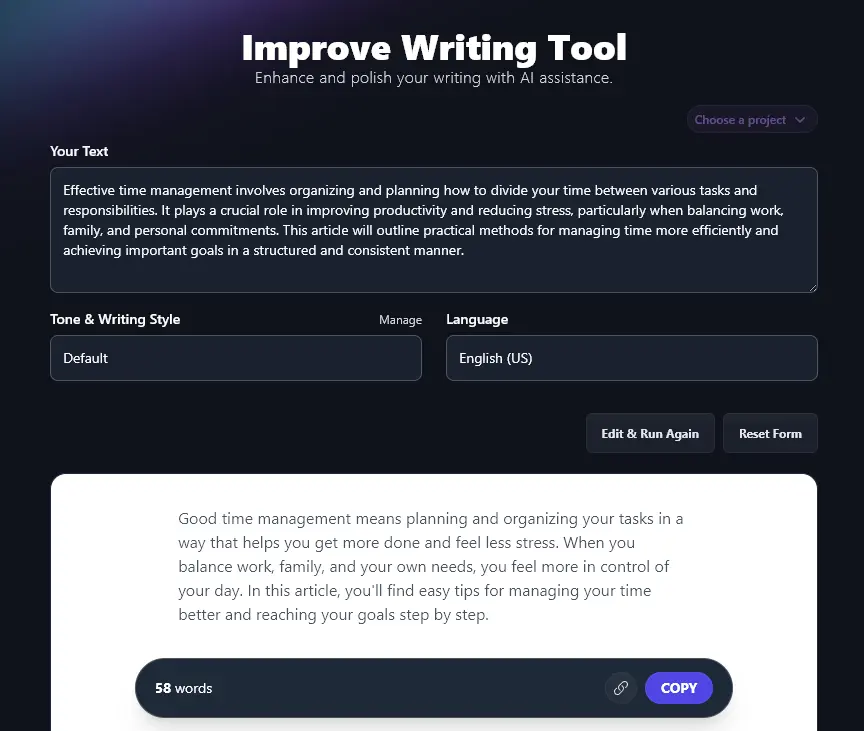
The 2026 writing engine includes:
-
Rewrite with tone control
-
Fix grammar instantly
-
Expand or shorten content
-
Create outlines
-
Generate ideas
-
Write blogs
-
Draft emails
-
Create scripts
-
Translate instantly
Tone options include:
-
Formal
-
Friendly
-
Academic
-
Concise
-
Marketing
-
Creative
Notion AI feels like a human editor built into your workspace.https://velimoza.com/claude-review-2026/
2.2 Feature 2 — Auto-Summarization 2.0 (2026 Upgrade)
The new summarization engine is one of the biggest upgrades.
It can now summarize:
-
Entire pages
-
Meeting notes
-
Data tables
-
Research documents
-
Complex project pages
-
Multi-section documents
The 2026 engine is 40% more accurate and includes action items automatically.
2.3 Feature 3 — AI for Databases (Powerful 2026 Addition)
This transforms Notion into a true data assistant.
Notion AI can:
-
Analyze databases
-
Generate insights
-
Build formulas
-
Explain relationships
-
Suggest filters
-
Create charts
-
Summarize table contents
This is one of the most requested features finally perfected in 2026.
2.4 Feature 4 — Notion AI Autofill
Autofill expands database power:
-
Fill missing data
-
Predict entries
-
Categorize items
-
Generate tags
-
Build task lists
-
Clean messy data
A huge time-saving feature for companies.
2.5 Feature 5 — Notion AI Actions (New in 2026)


Actions allow AI to:
-
Create tasks
-
Move blocks
-
Edit pages
-
Update status columns
-
Build new subpages
-
Assign roles
-
Apply templates
This turns Notion AI into an automation engine, not just a text generator.
2.6 Feature 6 — Meeting Intelligence (2026)
When you paste meeting transcripts:
Notion AI can:
-
Identify decisions
-
Extract action items
-
Highlight responsibilities
-
Create summaries
-
Generate follow-up tasks
Teams save hours per meeting.
2.7 Feature 7 — AI Search & Knowledge Retrieval
The 2026 AI search system finds:
-
Content buried in old pages
-
Notes you forgot
-
Related documents
-
Cross-linked insights
-
Duplicates
It uses semantic intelligence, not keywords.
2.8 Feature 8 — AI Templates (2026 Library Update)
You can now generate:
-
Project templates
-
Branding kits
-
Blog systems
-
Team wikis
-
Client dashboards
-
Research workspaces
-
Personal planners
Notion AI builds entire systems instantly.
PART 3 — Notion AI Real-World Use Cases (2026)
3.1 Use Case — Students


Notion AI helps students with:
-
Assignment writing
-
Summaries
-
Study notes
-
Research documents
-
Flashcards
-
Revision material
-
Project work
Students in 2026 rely on AI for structured academic work.
3.2 Use Case — Content Creators
Creators can generate:
-
Blog posts
-
SEO content
-
Social media scripts
-
YouTube outlines
-
Captions
-
Hooks
-
Branding content
Notion AI becomes a complete content studio.https://velimoza.com/perplexity-ai-review-2026/
3.3 Use Case — Businesses & Teams
Teams use Notion AI for:
-
SOP creation
-
Documentation
-
Project management
-
Database cleaning
-
Meeting analysis
-
Team dashboards
-
Knowledge bases
It transforms operational efficiency in 2026.
3.4 Use Case — Agencies
Agencies save hours using AI for:
-
Client proposals
-
Reports
-
Storyboards
-
Social calendars
-
Task automation
-
Content briefs
Agencies that use Notion AI outperform those that don’t.
3.5 Use Case — Personal Productivity
Individuals use Notion AI for:
-
Planning
-
Journaling
-
Task automation
-
Budgeting
-
Learning
-
Daily tracking
It is a life management assistant.
PART 4 — Notion AI Review: Pricing, Pros, Cons & Verdict (2026)
4.1 Notion AI Pricing (2026 Updated)
| Plan | Price (2026) | Notes |
|---|---|---|
| Notion AI Add-on | $10 per user/month | Works with any plan |
| Notion Plus + AI | $20 per user/month | Best for teams |
| Notion Business + AI | $30 per user/month | Advanced permissions |
| Notion Enterprise | Custom | Full automation, API credits |
Notion AI remains cheaper than ChatGPT Teams for workspace-wide collaboration.
4.2 Pros (2026)
-
Deep workspace integration
-
Fast writing & editing
-
Powerful summarization
-
Best database AI
-
Meeting intelligence
-
Workflow automation
-
Clean UI
-
Affordable pricing
4.3 Cons (2026)
-
Needs internet
-
Limited as standalone AI
-
Not ideal for long research tasks
-
Lacks deep reasoning like ChatGPT 5.2
-
Heavily dependent on Notion ecosystem
4.4 Notion AI vs ChatGPT 5.2 (2026)
| Feature | Notion AI | ChatGPT 5.2 |
|---|---|---|
| Reasoning | Moderate | Advanced |
| Writing | Strong | Stronger |
| Workspace integration | Best | Medium |
| Automation | Good | Excellent |
| Database analysis | Amazing | Limited |
| Creativity | Good | Higher |
| Cost | Low | Medium |
4.5 Notion AI Review: Final Verdict (2026)
Notion AI is the best AI for productivity, documentation, and workspace automation in 2026.
If you write, organize, manage projects, or collaborate —
Notion AI is absolutely worth using.
FAQ — Notion AI Review (2026 Edition)
1. Is Notion AI worth it in 2026?
Yes. Its automation, summarization, writing, and database features are extremely valuable.
2. Is Notion AI better than ChatGPT?
For workspace tasks — yes.
For reasoning — ChatGPT is still stronger.
3. Does Notion AI write content?
Yes, from blogs to emails to scripts.
4. Can Notion AI automate tasks?
Yes. Actions (2026) allow automation inside pages and databases.
5. Does Notion AI analyze data?
The 2026 database AI is excellent for insights, formulas, summaries, and structuring tables.
6. Is Notion AI safe?
Notion uses secure cloud encryption and workspace-level permissions.
1. Notion Official AI Page
https://www.notion.so/product/ai
2. Notion Help Center – AI Features
https://www.notion.so/help/notion-ai
3. OpenAI Blog (AI ecosystem reference)
4. Stanford Human-Centered AI Research
5. Microsoft AI Learning Hub (automation reference)
https://learn.microsoft.com/en-us/ai/
6. UNESCO AI Ethics
https://www.unesco.org/en/artificial-intelligence/ethics