
Table of Contents
-
Introduction
-
What Is Descript
-
Why Descript Is Popular in 2026
-
How Descript Works
-
Core Features of Descript
-
Overdub: AI Voice Cloning Explained
-
Descript for Podcast Editing
-
Descript for Video Creators
-
Descript for Content Marketers
-
Descript for Teams and Businesses
-
Descript Pricing Plans
-
Free vs Paid: What Do You Get
-
Comparison Table: Descript vs Adobe Audition vs CapCut
-
Pros of Descript
-
Cons and Limitations
-
Performance, Speed, and Reliability
-
Data Privacy, Ethics, and AI Voice Concerns
-
Real-World Use Cases and Results
-
Who Should Use Descript
-
Who Should Avoid Descript
-
Is Descript Worth It in 2026
-
FAQs
-
Final Verdict
1. Introduction
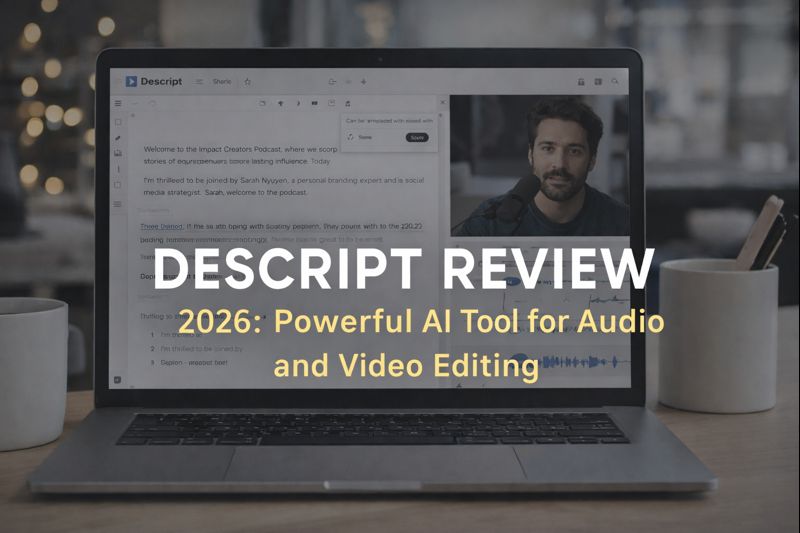
Descript review 2026 explains how this AI-powered audio and video editing tool helps creators edit content faster and more efficiently.Audio and video editing used to require technical expertise, expensive software, and hours of manual work. In 2026, that reality has changed dramatically. AI-powered tools are now transforming how creators edit podcasts, videos, and marketing content—and Descript is one of the biggest names leading this shift.
This Descript review explores how the platform works, what makes it different, and whether it truly delivers on its promise of “editing media like a document.” We will examine Descript from multiple angles: features, pricing, performance, and real-world usability for creators, businesses, and teams.
2. What Is Descript
Descript is an AI-powered audio and video editing platform that allows users to edit media by editing text. Instead of working with waveforms or timelines, users simply modify a transcript, and Descript automatically applies changes to the audio or video.
Descript is developed by Descript and is widely used by podcasters, YouTubers, educators, and marketing teams.
At its core, Descript combines:
-
Transcription
-
Audio editing
-
Video editing
-
Screen recording
-
AI voice generation
All inside a single interface.https://velimoza.com/perplexity-ai-review-2026/
3. Why Descript Is Popular in 2026
Several trends explain Descript’s continued growth in 2026:
-
Explosion of podcasts and video content
-
Demand for faster editing workflows
-
Rise of solo creators and small teams
-
Increased adoption of AI in creative tools
Descript’s biggest strength is simplicity. It removes the technical barriers that traditionally made editing intimidating.
4. How Descript Works
Descript works in three basic steps:
-
Upload or record audio/video
-
AI transcribes the content
-
Edit the text → media edits automatically
Deleting a sentence in the transcript deletes it from the audio or video. Rearranging paragraphs rearranges clips. This text-based workflow is what sets Descript apart from traditional editors.This Descript review shows why text-based editing is becoming the preferred workflow for modern creators.
5. Core Features of Descript
Text-Based Editing
Edit audio and video by editing text—no timeline required.
Automatic Transcription
High-accuracy transcription with speaker detection.
Filler Word Removal
Remove “um,” “uh,” and long pauses with one click.
Screen Recording
Built-in screen recorder for tutorials and demos.
Multitrack Editing
Support for multiple speakers and tracks.https://velimoza.com/notion-ai-review/
6. Overdub: AI Voice Cloning Explained
Overdub is Descript’s AI voice cloning feature. It allows users to generate new audio in their own voice by typing text.
Use cases include:
-
Fixing mistakes without re-recording
-
Updating old episodes
-
Creating voiceovers quickly
Ethically, Descript requires explicit consent and voice training, which helps prevent misuse.
7. Descript for Podcast Editing
Podcasters benefit the most from Descript:
-
Edit episodes in minutes instead of hours
-
Remove filler words instantly
-
Generate transcripts for SEO
-
Repurpose podcast content into clips
This Descript review finds it especially valuable for weekly or daily podcast workflows.
8. Descript for Video Creators
Video creators use Descript for:
-
Talking-head videos
-
YouTube content
-
Tutorials and explainers
Features like auto captions, screen recording, and text-based cuts make Descript a strong alternative to traditional video editors for non-cinematic content.
9. Descript for Content Marketers
Marketing teams use Descript to:
-
Create product demos
-
Edit webinars
-
Produce social video content
The speed advantage is significant, especially when working with tight deadlines.
10. Descript for Teams and Businesses
Descript supports collaboration through:
-
Shared projects
-
Commenting
-
Version history
Teams can maintain consistent voice and branding across content.https://velimoza.com/canva-ai-review/
11. Descript Pricing Plans (2026)
Descript offers:
-
Free plan (limited features)
-
Creator plan
-
Pro plan
-
Enterprise plan
Pricing is subscription-based and competitive compared to traditional editing software.
12. Free vs Paid: What Do You Get
| Feature | Free | Paid |
|---|---|---|
| Transcription | Limited | Extended |
| Overdub | ❌ | ✅ |
| Filler Word Removal | ❌ | ✅ |
| Export Quality | Standard | High |
| Collaboration | Limited | Full |
Paid plans unlock the true power of Descript.https://velimoza.com/chatgpt-2026-honest-review/
13. Comparison Table: Descript vs Adobe Audition vs CapCut
| Feature | Descript | Adobe Audition | CapCut |
|---|---|---|---|
| Text-Based Editing | ✅ Yes | ❌ No | ❌ No |
| AI Voice Cloning | ✅ Yes | ❌ No | ❌ No |
| Ease of Use | Very Easy | Hard | Easy |
| Podcast Focus | Excellent | Moderate | Low |
| Video Editing | Basic–Medium | ❌ No | Strong |
| Best For | Creators & podcasters | Audio pros | Social videos |
14. Pros of Descript
-
Extremely beginner-friendly
-
Saves massive editing time
-
All-in-one platform
-
Strong AI features
-
Great for podcasts and talking videos
- One major advantage highlighted in this Descript review is the massive time saved during podcast and video editing.
15. Cons and Limitations
-
Not suitable for cinematic video editing
-
Advanced audio pros may feel limited
-
Overdub accuracy depends on voice training
-
Requires stable internet connection
16. Performance, Speed, and Reliability
In real-world use, Descript performs reliably:
-
Fast transcription
-
Stable exports
-
Cloud-based syncing
Minor lag can occur on large projects, but overall performance is solid.
17. Data Privacy, Ethics, and AI Voice Concerns
Descript emphasizes ethical AI use:
-
Explicit consent for voice cloning
-
Clear user controls
-
Commercial usage rights
Users should still follow best practices when using AI voices.
18. Real-World Use Cases and Results
Users report:
-
50–70% faster editing
-
Lower outsourcing costs
-
More consistent content output
For many creators, Descript replaces multiple tools.
19. Who Should Use Descript
-
Podcasters
-
YouTubers (talking-head content)
-
Educators
-
Marketers
-
Freelancers
20. Who Should Avoid Descript
-
Film editors
-
Advanced sound engineers
-
Users needing complex visual effects
21. Is Descript Worth It in 2026
This Descript review concludes that Descript is absolutely worth it for creators who value speed, simplicity, and AI-assisted workflows. While it does not replace professional editing suites for advanced projects, it excels at everyday content production.
22. FAQs
Is Descript free to use?
Yes, with limited features.
Is Overdub safe?
Yes, with consent and ethical safeguards.
Can Descript replace video editors?
For simple videos, yes. For complex edits, no.
Is Descript good for beginners?
Yes, it is one of the easiest tools available.
23. Final Verdict
Descript is one of the most practical AI-powered editing tools available in 2026. It transforms editing from a technical task into a writing-like process, making content creation accessible to millions.
If your workflow involves podcasts, voice content, or simple videos, Descript is not just a convenience—it is a competitive advantage.
External Links (Authoritative)
-
Descript Official Website
https://www.descript.com -
World Economic Forum – AI and Creative Work
https://www.weforum.org/topics/future-of-work