


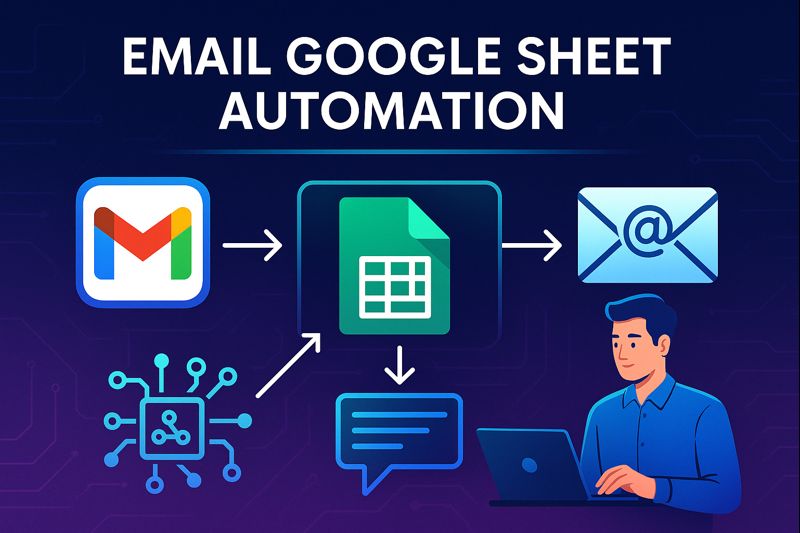
Email Google Sheet Automation: The Complete 2026 Guide to Automating Emails with Google Sheets

Introduction: Why Email Google Sheet Automation Matters in 2026
In 2026, businesses, creators, agencies, and even solo professionals handle hundreds or thousands of emails every week. Sending emails manually is no longer scalable, accurate, or efficient. This is where Email Google Sheet automation becomes a game-changer.
Email Google Sheet automation allows you to:
-
Send automated emails from spreadsheet data
-
Trigger emails based on conditions
-
Personalize emails at scale
-
Reduce manual work
-
Eliminate human error
-
Build no-code or low-code workflows
From lead follow-ups and invoice reminders to student notifications, HR onboarding, and marketing campaigns, Google Sheets combined with email automation tools has become one of the most powerful productivity systems in 2026.
This guide explains what Email Google Sheet automation is, how it works, best tools, real-world use cases, and step-by-step workflows—all in one place.
Part 1: What Is Email Google Sheet Automation?
1.1 Definition
Email Google Sheet automation is the process of automatically sending emails using data stored in Google Sheets. Each row in a sheet can act as a trigger or data source for an email.
Example:
-
Column A → Email address
-
Column B → Name
-
Column C → Status
-
Column D → Message
When a condition is met (like “Status = Approved”), an email is automatically sent.
1.2 Why Google Sheets Is the Core
Google Sheets is used because it is:
-
Cloud-based
-
Real-time
-
Collaborative
-
Easy to integrate
-
Beginner-friendly
In 2026, Google Sheets acts like a lightweight database for automation systems.
1.3 What Problems Automation Solves
Email Google Sheet automation solves:
-
Repetitive email sending
-
Missed follow-ups
-
Manual copy-paste errors
-
Slow response times
-
Poor tracking
Automation converts spreadsheets into action engines.https://velimoza.com/automate-your-entire-day/
Part 2: Common Use Cases of Email Google Sheet Automation (2026)
2.1 Business & Sales
-
Lead follow-up emails
-
CRM-style outreach
-
Demo scheduling confirmations
-
Proposal status updates
2.2 Marketing
-
Newsletter triggers
-
Campaign personalization
-
Webinar reminders
-
Coupon emails
2.3 HR & Internal Teams
-
Interview invitations
-
Offer letters
-
Onboarding emails
-
Employee updates
2.4 Education
-
Student result notifications
-
Assignment reminders
-
Admission updates
-
Fee reminders
2.5 Freelancers & Agencies
-
Client updates
-
Invoice reminders
-
Project status emails
In 2026, email Google Sheet automation is used everywhere—not just by developers.
Part 3: Best Tools for Email Google Sheet Automation (2026)
3.1 Google Apps Script (Native & Powerful)
Google Apps Script is Google’s built-in scripting tool.
Best for:
-
Full control
-
Custom logic
-
No third-party cost
Capabilities:
-
Read Google Sheet data
-
Send Gmail emails
-
Add conditions
-
Track sent emails
Limitation:
Requires basic JavaScript knowledge.
3.2 Zapier (No-Code Leader)
Zapier connects Google Sheets with Gmail or email platforms.
Best for:
-
Beginners
-
No-code users
-
Fast setup
Workflow example:
Google Sheet update → Gmail send email
3.3 Make (Advanced Automation)
Make (formerly Integromat) offers visual automation.
Best for:
-
Complex workflows
-
Conditional logic
-
Multi-step automation
3.4 Gmail + Google Workspace
Native Gmail integration supports:
-
Mail merge
-
Draft-based automation
-
Workspace add-onshttps://velimoza.com/everyday-tasks-you-can-automate-2026/
3.5 AI-Powered Automation Tools (2026 Trend)
AI now helps:
-
Write email content
-
Personalize subject lines
-
Predict best send times
This makes email Google Sheet automation smarter, not just faster.
Part 4: Step-by-Step Email Google Sheet Automation (Conceptual Workflow)
Step 1: Prepare Google Sheet
Create columns like:
-
Email
-
Name
-
Status
-
Message
-
Sent (Yes/No)
Step 2: Define Trigger Logic
Examples:
-
Send email when Status = “Approved”
-
Send reminder if Date < Today
-
Send follow-up if Sent = “No”
Step 3: Connect Email Tool
Choose:
-
Gmail (Apps Script)
-
Zapier
-
Make
Step 4: Personalize Email
Use dynamic variables:
-
Hello {{Name}}
-
Your request {{Status}}
Step 5: Track Emails
Update “Sent” column automatically to avoid duplicates.
Part 5: Advanced Automation Ideas (2026)
5.1 Conditional Email Logic
Different emails for different statuses:
-
Approved → Welcome email
-
Rejected → Polite rejection
-
Pending → Follow-up
5.2 Scheduled Email Automation
-
Daily reports
-
Weekly summaries
-
Monthly reminders
5.3 Multi-Email Sequences
AI + Sheets can trigger:
-
Email 1 → Day 1
-
Email 2 → Day 3
-
Email 3 → Day 7
5.4 Email Logging & Analytics
Track:
-
Sent time
-
Open status (via tools)
-
Response
Part 6: Benefits of Email Google Sheet Automation
Key Advantages
-
Saves hours every week
-
Reduces errors
-
Improves response speed
-
Scales effortlessly
-
Works for teams and solo users
In 2026, automation is not optional—it’s basic productivity hygiene.
Part 7: Common Mistakes to Avoid
-
Not validating email addresses
-
Sending duplicate emails
-
No unsubscribe logic
-
Poor subject lines
-
Ignoring email limits
Smart automation = rules + checks.https://velimoza.com/beginner-automation-guide-2026/
Part 8: Security & Best Practices (2026)
-
Use Google Workspace permissions
-
Avoid storing sensitive data publicly
-
Limit script access
-
Follow email compliance rules
Responsible automation builds trust.
Part 9: Email Google Sheet Automation vs Manual Emailing
| Feature | Manual Emails | Automation |
|---|---|---|
| Speed | Slow | Fast |
| Accuracy | Error-prone | High |
| Scalability | Limited | Unlimited |
| Personalization | Hard | Easy |
| Tracking | Manual | Automatic |
Automation wins in every category.
Part 10: Future of Email Google Sheet Automation
By late 2026:
-
AI will auto-write emails from sheet data
-
Automation will predict replies
-
Sheets will act like smart CRMs
-
Voice commands will trigger emails
Email Google Sheet automation is evolving into intelligent communication systems.
FAQ: Email Google Sheet Automation
Is Email Google Sheet automation free?
Yes, basic automation using Apps Script is free.
Do I need coding skills?
No. Tools like Zapier and Make require no coding.
Can I send bulk emails safely?
Yes, if you respect Gmail limits and compliance rules.
Is this suitable for small businesses?
Absolutely. Small teams benefit the most.
Is Email Google Sheet automation allowed by Google?
Yes, when used within usage policies.
Final Verdict
Email Google Sheet automation is one of the most practical, powerful, and high-ROI automation systems you can build in 2026.
If you use Google Sheets and send emails regularly, automation will:
-
Save time
-
Increase accuracy
-
Improve professionalism
-
Scale your work
This is not advanced tech anymore—
it’s essential automation.
✅ EXTERNAL LINKS
-
Google Apps Script – Official Documentation
https://developers.google.com/apps-script -
Google Sheets Help Center
https://support.google.com/docs/ -
Gmail Help & Usage Policies
https://support.google.com/mail/ -
Zapier – Google Sheets Email Automation
https://zapier.com/apps/google-sheets/integrations -
Make (Integromat) Automation Guides
https://www.make.com/en/help