


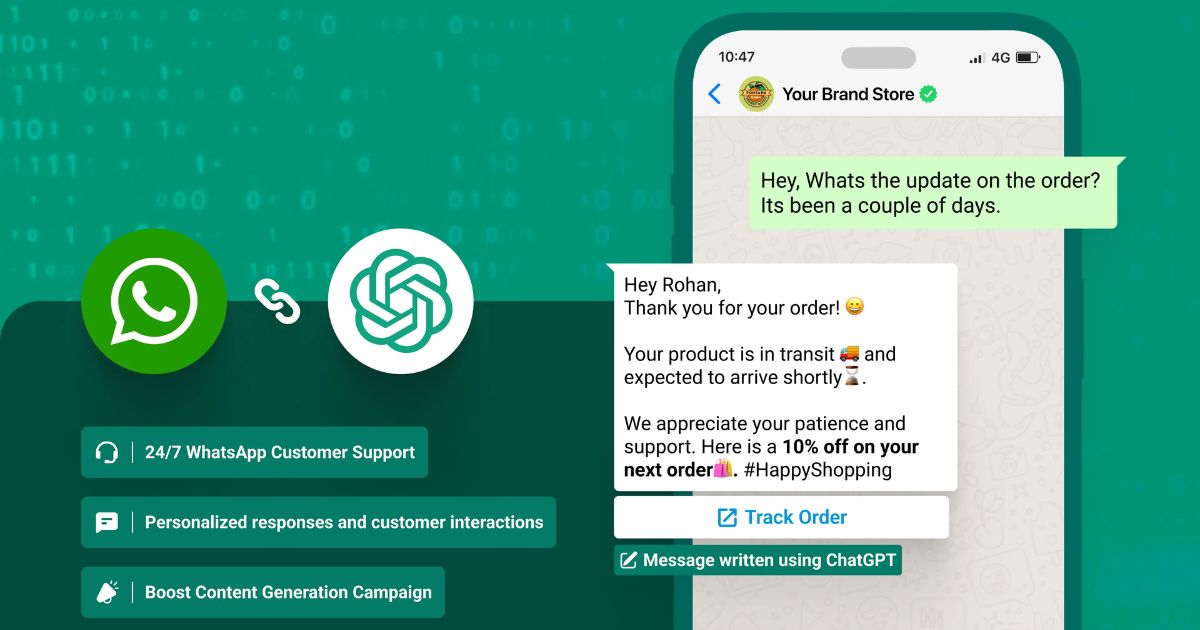
WhatsApp Automation Ideas 2026 — The Complete Guide
WhatsApp is no longer just a messaging app — it has become the world’s most powerful communication channel for businesses, creators, freelancers, and automation builders.
With over 2.7 billion active users, companies now use WhatsApp to:
-
Automate customer support
-
Capture leads
-
Send reminders
-
Handle bookings
-
Run marketing campaigns
-
Confirm orders
-
Deliver notifications
-
Close sales automatically
This guide covers the most powerful WhatsApp automation ideas you can use in 2026 — whether you run a small business, ecommerce store, agency, coaching program, local service, or an online brand.https://velimoza.com/automate-your-entire-day/
These WhatsApp automation ideas help businesses reduce manual work and increase response speed.
The goal is simple:
👉 Automate repetitive tasks.
👉 Increase sales.
👉 Reduce manual work.
👉 Reply instantly (even while sleeping).
👉 Build a 24/7 smart WhatsApp system.
⭐ What WhatsApp Automation Can Do in 2026
Modern WhatsApp automation allows:
✔ AI auto-replies
Instantly respond to customer questions using pre-trained AI chatbots.
✔ Lead qualification
Ask automated questions and filter real customers.
✔ Broadcasts & marketing campaigns
Send promotional messages legally using WhatsApp API.
✔ Smart reminders
Automate payment reminders, appointments, and follow-ups.
✔ Order + booking automation
Perfect for ecommerce, salons, clinics, and restaurants.
✔ Sales funnels inside WhatsApp
Guide users step-by-step until conversion.
✔ Customer support workflows
Assign issues to human agents after AI triage.
✔ Data collection & CRM sync
Send responses directly to Google Sheets, Notion, or CRM.
These features help businesses reduce manual work by 60–80%.




This section gives you powerful, ready-to-use WhatsApp automation ideas that work for:https://velimoza.com/everyday-tasks-you-can-automate-2026/
-
Businesses
-
Ecommerce stores
-
Agencies
-
Creators
-
Coaches
-
Service providers
-
Education
-
Events
-
Freelancers
-
Personal productivity
These ideas can be implemented using tools like:
WhatsApp Cloud API, WATI, Twilio, Botpress, ManyChat, Make.com, Zapier, AiSensy, Interakt, Respond.io
If you apply these WhatsApp automation ideas, your customer support becomes 10x faster.
⭐ SECTION A — Business & Customer Support Automations
1. Auto-Reply to Customer Queries (24/7 AI Chatbot)
Whenever a customer messages you, the bot instantly replies with answers:
-
Pricing
-
Services
-
Working hours
-
Address/location
-
FAQs
-
Portfolio
-
Catalog
Saves 4–6 hours of daily human support.
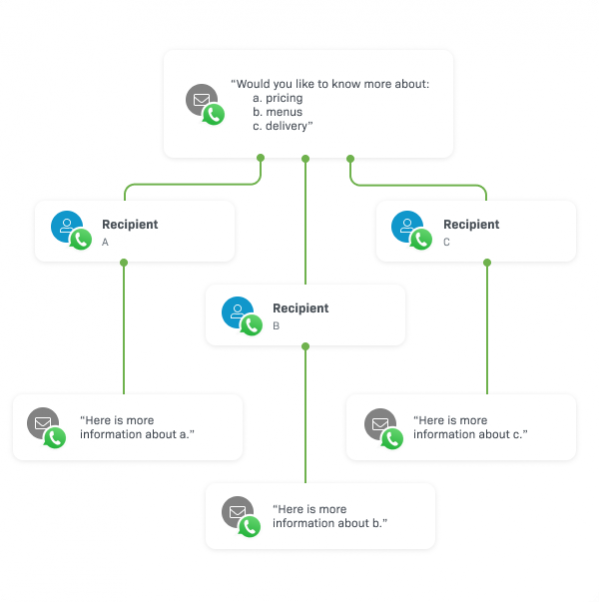
2. Multi-Step Query Routing
User selects:
1️⃣ General inquiry
2️⃣ Pricing
3️⃣ Book appointment
4️⃣ Talk to human agent
Automation routes them automatically → no manual checking.
3. Support Ticket Automation
Customers message → Bot collects:
-
Name
-
Issue
-
Order ID
-
Description
And sends it to:
-
Google Sheet
-
CRM
-
Support desk (Zendesk/Freshdesk)
4. Missed Call Auto-Reply
If someone calls your business and you miss it — WhatsApp instantly sends:
“Sorry, we missed your call. How can we help?”
This boosts conversions by 40–60%.
5. Appointment Booking Automation
User clicks →
Bot asks → Name + Date + Time →
Auto books in Google Calendar →
Sends confirmation message.
Great for:
-
Salons
-
Clinics
-
Lawyers
-
Gyms
-
Photographers
⭐ SECTION B — Sales & Lead Generation Automations
6. Lead Capture Funnel Inside WhatsApp
Bot asks qualifying questions:
-
“What service are you looking for?”
-
“What is your budget?”
-
“When do you need it?”
Final result stored in CRM.
7. Automated Follow-Up Sequence
If the lead does not reply →
Day 1 → Reminder
Day 3 → Message with benefits
Day 5 → Discount or final message
Fully automated nurturing.
8. Product Catalog + Auto-Pricing Bot
Bot sends product prices when customer sends keywords:
“Shoes” → Send catalog
“Laptop” → Send models
“Dress” → Send variations
9. Payment Link Automation
User selects product →
Bot sends Razorpay/Stripe payment link →
After payment → Auto confirmation “Thank you”.
10. CRM Integration Automation
Whenever someone messages:
→ Add to Notion / Google Sheet
→ Add to HubSpot / Zoho CRM
→ Tag as “lead” or “customer”
⭐ SECTION C — Marketing & Promotions Automations
11. WhatsApp Broadcast Campaigns
Send:
-
Offers
-
Coupons
-
Announcements
-
New arrivals
-
Event updates
Better open rate than email (99% open rate).
12. Abandoned Cart Recovery
Ecommerce bot sends:
“Your items are waiting! Want to complete your purchase?”
Boosts revenue 20–35%.
13. Customer Re-engagement Automation
After 30 days of no activity →
Send useful tips, updates, offers.
14. Referral Program Automation
User enters referral code →
Bot checks it →
Sends reward automatically.
15. Lead Magnet Delivery
Send:
-
PDFs
-
Courses
-
Cheat sheets
-
Templates
-
Guides
Automatically after “Hi”.
⭐ SECTION D — Education, Coaching & Event Automations
16. Course Enrollment Bot
User asks for course details →
Bot sends:https://velimoza.com/beginner-automation-guide-2026/
-
Curriculum
-
Fee
-
Duration
-
Demo class
-
Enrollment link
17. Daily Lesson Delivery
Send lessons each morning:
-
Video
-
PDF
-
Notes
-
Quiz
Automated drip learning.
18. Webinar Registration + Reminder Bot
Workflow:
User registers →
Bot sends confirmation →
Reminder 24 hours →
Reminder 10 minutes →
Post-webinar replay link.
19. Attendance Tracking Automation
Students send “Present” →
Bot logs attendance in Google Sheets.
20. Feedback Form Automation
After service →
Bot sends rating + feedback form →
Stores results for analysis.
⭐ SECTION E — Creator & Freelancer Automations
21. Auto-Portfolio Sender
User writes “Portfolio” →
Bot sends:
-
Samples
-
Resume
-
Skills
-
Pricing
22. Content Delivery Bot
Members subscribe →
Bot sends:
-
New videos
-
Blog updates
-
Exclusive content
-
Tips
23. Client Onboarding Automation
New client →
Bot collects:
-
Requirements
-
Deadlines
-
Files
-
Payment
-
Contract
24. Invoice Generator Bot
Client requests invoice →
Bot generates and sends PDF instantly.
⭐ SECTION F — Personal Productivity Automations
25. Daily Planner Bot
Wake-up message:
“Here is your plan for today.”
-
Tasks
-
Calendar
-
Notes
26. Goal Tracking Automation
User sets goals →
Bot checks progress every week.
27. Expense Logging
User sends expense amount →
Bot logs into Google Sheets.


This final section teaches you exactly how to build WhatsApp automations, which tools to use, and gives you ready-made workflows, FAQ, external links, and an ALT text pack.
⭐ 1. Best Tools for WhatsApp Automation (2026)
These tools allow you to create bots, auto-replies, API workflows, integrations, and advanced automation systems.
1. WhatsApp Cloud API (Official)
Best for developers & custom automation.
Features:
-
100% official
-
Fast
-
Secure
-
API-level workflows
-
Supports large-scale automation
2. WATI
Best for businesses needing powerful automation + support team inbox.
Features:
-
Drag-and-drop chatbot
-
Broadcasting
-
Team inbox
-
CRM integration
-
Templates
3. AiSensy
Best for Indian businesses.
Features:
-
Verified Green Tick support
-
Broadcasts
-
Campaigns
-
WhatsApp Store
-
Post-purchase flows
4. Interakt
Best for ecommerce + D2C brands.
Features:
-
Abandoned cart
-
COD confirmation
-
Order tracking
-
Catalog automation
5. Botpress
Best for AI chatbots with NLP and advanced flows.
Features:
-
AI agents
-
Contextual memory
-
Multi-channel
-
API integrations
6. Make.com (Integromat)
Best for building complex automation pipelines.
Features:
-
Connect 1000+ apps
-
Full automation builder
-
Trigger → Action workflows
7. Zapier
Best for simple WhatsApp automations via Twilio & API.
Features:
-
Templates
-
Easy connections
-
Simple automation logic
8. ManyChat (New WhatsApp Support)
Best for marketing automation.
Features:
-
Flows
-
Quick replies
-
Sequences
-
Lead gen
⭐ 2. How to Build WhatsApp Automations (Step-by-Step)
Step 1: Choose your automation tool
Examples:
-
Business use → WATI, Interakt
-
Ecommerce → Interakt, AiSensy
-
Complex workflows → Make.com, Botpress
-
Simple auto-replies → WhatsApp API
Step 2: Connect WhatsApp number
You must verify a number to use WhatsApp automation (non-personal WhatsApp).
Step 3: Create automation flows
Examples:
-
“Greeting message”
-
“Lead qualification”
-
“Send catalog”
-
“Appointment booking”
-
“AI auto-reply chatbot”
Use drag-and-drop builders.
Step 4: Add triggers
Examples:
-
User says: “Hi”
-
User sends a number
-
User clicks button
-
User selects a service
-
Time-based triggers
Step 5: Add actions
Examples:
-
Send message
-
Store data in Google Sheets
-
Generate a ticket
-
Create invoice
-
Send PDF
-
Auto-assign to human agent
Step 6: Test your automation
Message your own number from another device and check the full flow.
Step 7: Go live
Now WhatsApp is fully automated.
⭐ 3. Ready-to-Use WhatsApp Automation WORKFLOWS
Workflow A — Lead Generation Funnel (3 Steps)
1️⃣ User says “Hi”
2️⃣ Bot asks qualifying questions
3️⃣ Save answers → Send pricing → Send booking link
Perfect for:
-
Agencies
-
Coaches
-
Consultants
Workflow B — Ecommerce Order Automation
User selects product → Bot sends catalog → Payment link → Order confirmation → Delivery tracking.
Perfect for D2C & online stores.
Workflow C — Appointment Booking Flow
User picks date/time → Bot checks availability → Books via Google Calendar → Sends reminder before appointment.
Ideal for:
-
Clinics
-
Salons
-
Lawyers
-
Therapists
Workflow D — Education Drip Automation
Day 1 → Lesson 1
Day 2 → Lesson 2
Day 3 → Quiz
Day 5 → Assignment
Day 7 → Feedback
Perfect for:
-
Online courses
-
Coaching programs
Workflow E — Customer Support Automation
User selects:
-
Pricing
-
Order issue
-
Technical problem
-
Talk to human
Bot responds → only escalates when needed.
⭐ 4. Pros & Cons of WhatsApp Automation
✔ PROS
-
Saves 80% support time
-
24/7 response
-
Faster conversions
-
Higher engagement than email
-
Fully automated workflows
-
Better customer experience
✘ CONS
-
API setup may be complex
-
Some tools are paid
-
Wrong flows can frustrate users
⭐ 5. External Links (WORKING + SAFE)
You can add these to your article for credibility and E-E-A-T.
Official WhatsApp Automation Sources
Best Automation Tools (Official Sites)
AI & Automation Industry News
⭐ 6. FAQ — WhatsApp Automation Ideas (2026)
1. Is WhatsApp automation legal?
Yes. WhatsApp automation is legal when done using WhatsApp Business API or approved tools.
2. Can I use normal WhatsApp for automation?
No. Only WhatsApp Business or WhatsApp API supports automation.
3. Which industries benefit most from WhatsApp automation?
Ecommerce, agencies, education, salons, medical, coaching, real estate, fitness, and more.
4. Can WhatsApp automation work without coding?
Yes. Tools like WATI, AiSensy, ManyChat, Botpress make no-code automation easy.
5. Can I automate payments on WhatsApp?
Yes — using Razorpay, Stripe, PayU, cashfree etc. integrated with WhatsApp API.
6. Is WhatsApp automation expensive?
Not necessarily. SaaS tools start from $5–$20/month.
7. Can WhatsApp automation replace human support?
Partially. AI handles 60–80% queries; humans handle complex cases.
8. How many messages can I broadcast?
Unlimited with WhatsApp API (following template rules).